
Table Management
Table Management
In the table model, it is recommended that one table corresponds to one type of device, for managing time series data of such devices. Devices of the same type usually have the same or similar set of measurement points, such as wind turbines, vehicles, production equipment or monitoring objects of the same category.
1. Basic Concepts
1.1 Table
Tables are generally used to store time series data for the same type of device. During data modeling, device identification information can be designed as TAG columns, static device descriptions as ATTRIBUTE columns, and time-varying collected values as FIELD columns.
1.2 Time Column, Tag Column, Attribute Column and Measurement Column
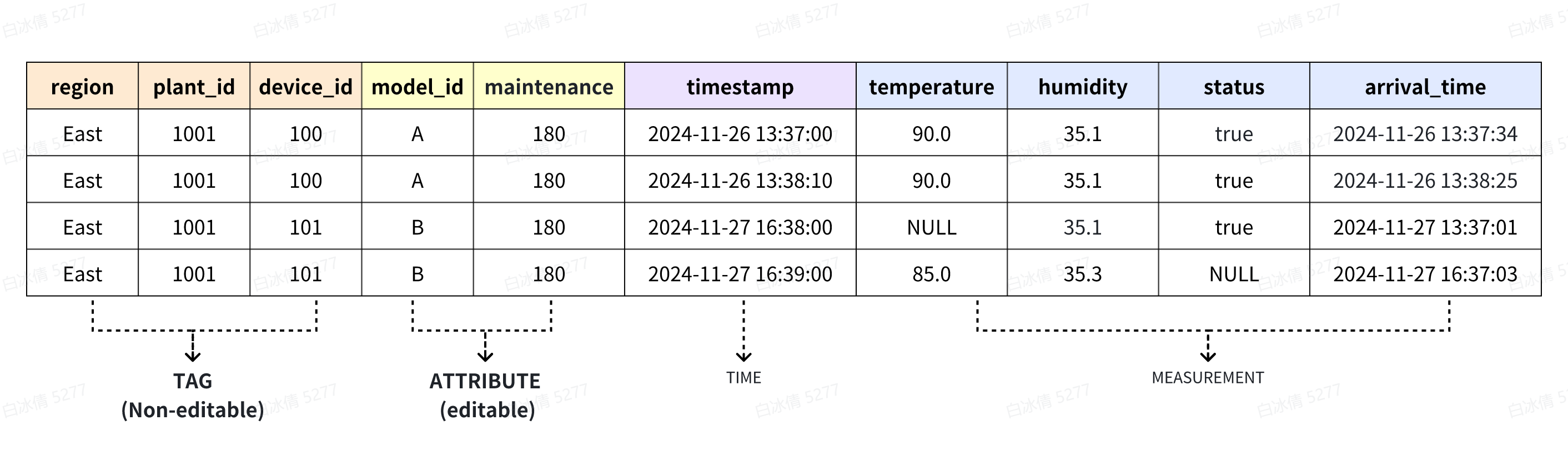
The table structure in the table model is generally shown in the figure above. Columns can be classified into the following categories by purpose:
| Concept | Description |
|---|---|
| Time Column (TIME) | Each table must contain one time column of the TIMESTAMP data type, which records the timestamp corresponding to each data point. |
| Tag Column (TAG) | Used to identify devices and can serve as the composite primary key of a device. It typically stores information for locating devices, such as region, plant, and device ID. Values in tag columns usually do not change over time. |
| Attribute Column (ATTRIBUTE) | Used to describe static attributes of a device, such as model, manufacturer, and maintenance information. Attribute columns do not change over time and can be added or updated. |
| Measurement Column (FIELD) | Used to store physical quantities or metrics collected from devices, whose values change over time, such as temperature, humidity, current, voltage, and status. |
In terms of query filtering efficiency, the general priority order is: time column and tag columns first, followed by attribute columns, and measurement columns last.
1.3 Devices and Measurement Points
In the table model, a device is uniquely identified by the combination of values from all TAG columns in a table. For example, if a table contains three TAG columns: region, plant_id, and device_id, each unique combination of region + plant_id + device_id represents an independent device.
Measurement points correspond to FIELD columns in the table. One FIELD column for a single device generates multiple data points over time, and these time-ordered data points form a time series.
Therefore, the number of measurement points per table in the table model can be expressed by the following formula:
Number of measurement points per table = Number of devices × Number of FIELD columns
For the specific calculation process, please refer to Section 2.7 Metadata Query.
1.4 Table-Level TTL
The TTL of a table defaults to the TTL of its parent database. If a table is configured with a separate TTL, the table-level TTL takes precedence. Proper use of table-level TTL allows different data retention periods to be set for different business tables.
For a more detailed introduction to TTL features, see: TTL Delete Data
For further information on the IoTDB tree-table twin model, model selection methods and typical modeling solutions, please refer to Modeling Scheme Design.
2. Table Management
2.1 Create a Table
Manually create a table within the current or specified database.The format is "database name. table name".
Syntax:
createTableStatement
    : CREATE TABLE (IF NOT EXISTS)? qualifiedName
        '(' (columnDefinition (',' columnDefinition)*)? ')'
        charsetDesc?
        comment?
        (WITH properties)?
     ;

charsetDesc
    : DEFAULT? (CHAR SET | CHARSET | CHARACTER SET) EQ? identifierOrString
    ;

columnDefinition
    : identifier columnCategory=(TAG | ATTRIBUTE | TIME) charsetName? comment?
    | identifier type (columnCategory=(TAG | ATTRIBUTE | TIME | FIELD))? charsetName? comment?
    ;

charsetName
    : CHAR SET identifier
    | CHARSET identifier
    | CHARACTER SET identifier
    ;

comment
    : COMMENT string
    ;
Note:
When creating a table, you do not need to specify a time column. IoTDB automatically adds a column named "time" and places it as the first column. All other columns can be added by enabling the
enable_auto_create_schemaoption in the database configuration, or through the session interface for automatic creation or by using table modification statements.Since version V2.0.8.2, tables support custom naming of the time column during creation. The order of the custom time column in the table is determined by the order in the creation SQL. The related constraints are as follows:
- When the column category is set to TIME, the data type must be TIMESTAMP.
- Each table allows at most one time column (columnCategory = TIME).
- If no time column is explicitly defined, no other column can use "time" as its name to avoid conflicts with the system's default time column naming.
The column category can be omitted and defaults to FIELD. When the column category is TAG or ATTRIBUTE, the data type must be STRING (can be omitted).
The TTL of a table defaults to the TTL of its database. If the default value is used, this attribute can be omitted or set to default.
<TABLE_NAME> table name has the following characteristics:
It is case-insensitive and, upon successful creation, is uniformly displayed in lowercase.
The name can include special characters, such as
~!"%`, etc.Table names containing special characters or Chinese characters must be enclosed in double quotation marks ("") during creation.
- Note: In SQL, special characters or Chinese table names must be enclosed in double quotes. In the native API, no additional quotes are needed; otherwise, the table name will include the quote characters.
When naming a table, the outermost double quotation marks (
"") will not appear in the actual table name.-- In SQL "a""b" --> a"b """""" --> "" -- In API "a""b" --> "a""b"
columnDefinition column names have the same characteristics as table names and can include the special character
..COMMENT adds a comment to the table.
Examples:
CREATE TABLE table1 (
  time TIMESTAMP TIME,
  region STRING TAG,
  plant_id STRING TAG,
  device_id STRING TAG,
  model_id STRING ATTRIBUTE,
  maintenance STRING ATTRIBUTE COMMENT 'maintenance',
  temperature FLOAT FIELD COMMENT 'temperature',
  humidity FLOAT FIELD COMMENT 'humidity',
  status Boolean FIELD COMMENT 'status',
  arrival_time TIMESTAMP FIELD COMMENT 'arrival_time'
) COMMENT 'table1' WITH (TTL=31536000000);
Note: If your terminal does not support multi-line paste (e.g., Windows CMD), please reformat the SQL statement into a single line before execution.
2.2 View Tables
Used to view all tables and their properties in the current or a specified database.
Syntax:
SHOW TABLES (DETAILS)? ((FROM | IN) database_name)?Note:
- If the
FROMorINclause is specified, the command lists all tables in the specified database. - If neither
FROMnorINis specified, the command lists all tables in the currently selected database. If no database is selected (USEstatement not executed), an error is returned. - When the
DETAILSoption is used, the command shows the current state of each table:USING: The table is available and operational.PRE_CREATE: The table is in the process of being created or the creation has failed; the table is not available.PRE_DELETE: The table is in the process of being deleted or the deletion has failed; the table will remain permanently unavailable.
Examples:
show tables details from database1;+---------------+-----------+------+-------+
| TableName| TTL(ms)|Status|Comment|
+---------------+-----------+------+-------+
| table1|31536000000| USING| table1|
+---------------+-----------+------+-------+2.3 View Table Columns
Used to view column names, data types, categories, and states of a table.
Syntax:
(DESC | DESCRIBE) <TABLE_NAME> (DETAILS)?Note: If the DETAILS option is specified, detailed state information of the columns is displayed:
USING: The column is in normal use.PRE_DELETE: The column is being deleted or the deletion has failed; it is permanently unavailable.
Examples:
desc table1 details;+------------+---------+---------+------+------------+
| ColumnName| DataType| Category|Status| Comment|
+------------+---------+---------+------+------------+
| time|TIMESTAMP| TIME| USING| null|
| region| STRING| TAG| USING| null|
| plant_id| STRING| TAG| USING| null|
| device_id| STRING| TAG| USING| null|
| model_id| STRING|ATTRIBUTE| USING| null|
| maintenance| STRING|ATTRIBUTE| USING| maintenance|
| temperature| FLOAT| FIELD| USING| temperature|
| humidity| FLOAT| FIELD| USING| humidity|
| status| BOOLEAN| FIELD| USING| status|
|arrival_time|TIMESTAMP| FIELD| USING|arrival_time|
+------------+---------+---------+------+------------+2.4 View Table Creation Statement
Retrieves the complete definition statement of a table or view under the table model. This feature automatically fills in all default values that were omitted during creation, so the displayed statement may differ from the original CREATE statement.
This feature is supported starting from v2.0.5.
Syntax:
SHOW CREATE TABLE <TABLE_NAME>Note::
- This statement does not support queries on system tables.
Example:
show create table table1;+------+---------------------------------------------------------------------------------------------------------------------------------------------------------------------------------------------------------------------------------------------------------------------------------+
| Table| Create Table|
+------+---------------------------------------------------------------------------------------------------------------------------------------------------------------------------------------------------------------------------------------------------------------------------------+
|table1|CREATE TABLE "table1" ("region" STRING TAG,"plant_id" STRING TAG,"device_id" STRING TAG,"model_id" STRING ATTRIBUTE,"maintenance" STRING ATTRIBUTE,"temperature" FLOAT FIELD,"humidity" FLOAT FIELD,"status" BOOLEAN FIELD,"arrival_time" TIMESTAMP FIELD) WITH (ttl=31536000000)|
+------+---------------------------------------------------------------------------------------------------------------------------------------------------------------------------------------------------------------------------------------------------------------------------------+
Total line number = 12.5 Update Tables
Used to update a table, including adding or deleting columns, modify column type (V2.0.8.2) and configuring table properties.
Syntax:
#addColumn;
ALTER TABLE (IF EXISTS)? tableName=qualifiedName ADD COLUMN (IF NOT EXISTS)? column=columnDefinition;
#dropColumn;
| ALTER TABLE (IF EXISTS)? tableName=qualifiedName DROP COLUMN (IF EXISTS)? column=identifier;
#setTableProperties;
// set TTL can use this;
| ALTER TABLE (IF EXISTS)? tableName=qualifiedName SET PROPERTIES propertyAssignments;
| COMMENT ON TABLE tableName=qualifiedName IS 'table_comment';
| COMMENT ON COLUMN tableName.column IS 'column_comment';
#changeColumndatatype;
| ALTER TABLE (IF EXISTS)? tableName=qualifiedName ALTER COLUMN (IF EXISTS)? column=identifier SET DATA TYPE new_type=type;
Note::
The
SET PROPERTIESoperation currently only supports configuring theTTLproperty of a tableThe delete column function only supports deleting the ATTRIBUTE and FILD columns, and the TAG column does not support deletion.
The modified comment will overwrite the original comment. If null is specified, the previous comment will be erased.
Since version V2.0.8.2, modifying the data type of a column is supported. Currently, only columns with Category type FIELD can be modified.
- If the time series is concurrently deleted during the modification process, an error will be reported.
- The new data type must be compatible with the original type. The specific compatibility is shown in the following table:
Example:
add column
ALTER TABLE table1 ADD COLUMN IF NOT EXISTS a TAG COMMENT 'a';
ALTER TABLE table1 ADD COLUMN IF NOT EXISTS b FLOAT FIELD COMMENT 'b';
set TTL
ALTER TABLE table1 set properties TTL=3600;set comment
COMMENT ON TABLE table1 IS 'table1';
COMMENT ON COLUMN table1.a IS null;
alter column datatype
ALTER TABLE table1 ALTER COLUMN IF EXISTS b SET DATA TYPE DOUBLE;2.6 Delete Tables
Used to delete a table.
Syntax:
DROP TABLE (IF EXISTS)? <TABLE_NAME>Examples:
DROP TABLE table1;
DROP TABLE database1.table1;
2.7 Metadata Query
Under the table model, the total number of measurement points equals the sum of measurement points of all tables. Currently, the number of measurement points in a single table can be calculated with the formula:
Measurement points per single table = Number of devices × Number of field columns.
Support for directly querying measurement points under the table model via SQL statements will be available in future updates. Please stay tuned.
Take table1 in the sample data as an example.
In the organizational structure of this sample, there are three tag columns (region, plant_id, device_id) and four field columns (temperature, humidity, status, arrival_time).
A unique device is identified by the combination of all tag columns. Each unique combination of region + plant_id + device_id represents an independent device.
The sample data defines 2 regions: Beijing and Shanghai. Details are as follows:
- Beijing: 1 factory with ID 1001
- 2 devices under this factory: IDs 100 and 101
- Shanghai: 2 factories with IDs 3001 and 3002
- Factory 3001: 2 devices (IDs 100, 101)
- Factory 3002: 2 devices (IDs 100, 101)
In total, there are 6 unique tag combinations in the table, corresponding to 6 independent devices.
Complete Calculation Example for Single-Table Measurement Points
- Query the number of devices
IoTDB:database1> count devices from table1;
+--------------+
|count(devices)|
+--------------+
|             6|
+--------------+
Total line number = 1
It costs 0.019s- Calculate the total measurement points of the single table
- Number of devices: 6
- Number of field columns: 4
- Total measurement points of the table: 6 × 4 = 24