
ODBC
ODBC
1. 功能介绍
IoTDB ODBC 驱动程序提供了通过 ODBC 标准接口与数据库进行交互的能力,支持通过 ODBC 连接管理时序数据库中的数据。目前支持数据库连接、数据查询、数据插入、数据修改和数据删除等操作,可适配各类支持 ODBC 协议的应用程序与工具链。
注意:该功能从 V2.0.8.2 起支持。
2. 使用方式
推荐使用预编译二进制包安装,无需自行编译,直接通过脚本完成驱动安装与系统注册,目前仅支持 Windows 系统。
2.1 环境要求
仅需满足操作系统层面的 ODBC 驱动管理器依赖,无需配置编译环境:
| 操作系统 | 要求与安装方式 |
|---|---|
| Windows | 1. Windows 10/11、Server 2016/2019/2022:自带 ODBC 17/18 版本驱动管理器,无需额外安装 2. Windows 8.1/Server 2012 R2:需手动安装对应版本 ODBC 驱动管理器 |
2.2 安装步骤
- 联系天谋团队获取预编译二进制包
二进制包目录结构:
├── bin/
│   ├── apache_iotdb_odbc.dll
│   └── install_driver.exe
├── install.bat
└── registry.bat- 以管理员权限打开命令行工具(CMD/PowerShell),并运行以下命令:(可以将路径替换为任意绝对路径)
install.bat "C:\Program Files\Apache IoTDB ODBC Driver"脚本自动完成以下操作:
- 创建安装目录(如果不存在)
- 将
bin\apache_iotdb_odbc.dll复制到指定安装目录 - 调用
install_driver.exe通过 ODBC 标准 API(SQLInstallDriverEx)将驱动注册到系统
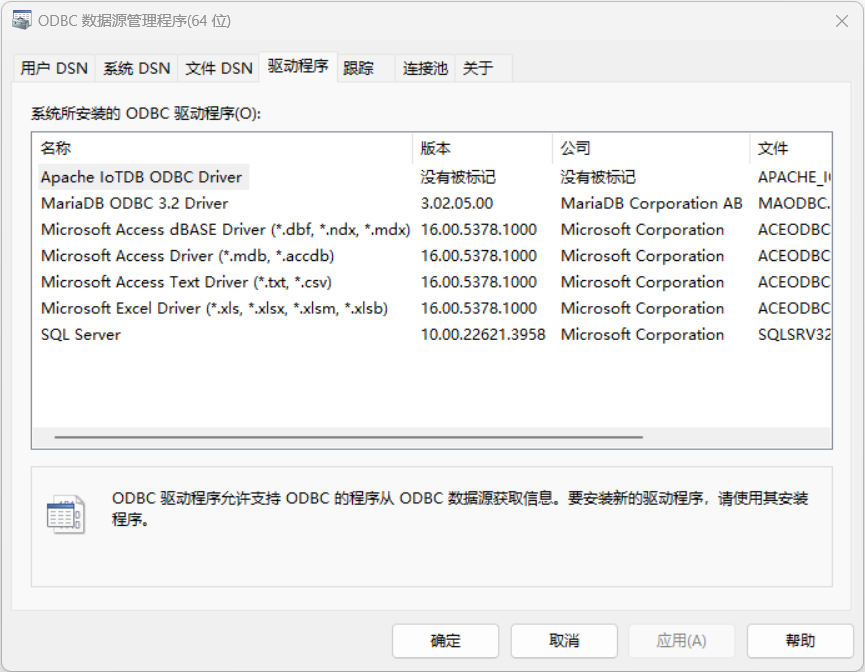
- 验证安装:打开「ODBC 数据源管理器」,在「驱动程序」选项卡中可查看到
Apache IoTDB ODBC Driver,即表示注册成功。
2.3 卸载步骤
- 以管理员身份打开命令提示符,
cd进入项目根目录。 - 运行卸载脚本:
uninstall.bat脚本会调用 install_driver.exe 通过 ODBC 标准 API(SQLRemoveDriver)从系统中注销驱动。安装目录中的 DLL 文件不会被自动删除,如需清理请手动删除。
2.4 连接配置
安装驱动后,需要配置数据源(DSN)才能让应用程序通过 DSN 名称连接数据库。IoTDB ODBC 驱动支持通过数据源和连接字符串配置连接参数两种方法。
2.4.1 配置数据源
通过 ODBC 数据源管理器配置
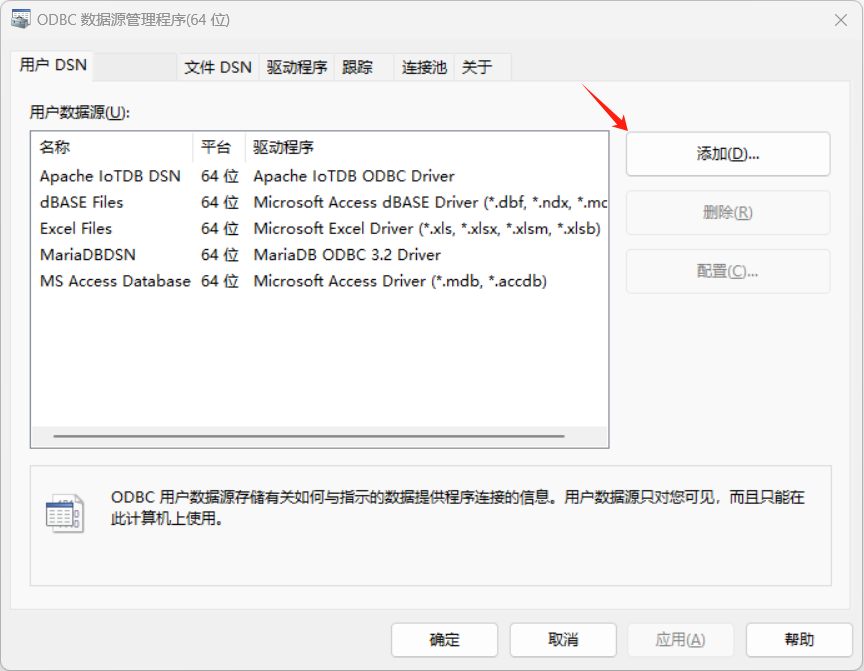
- 打开"ODBC 数据源管理程序",切换到"用户 DSN"选项卡,点击"添加"按钮。
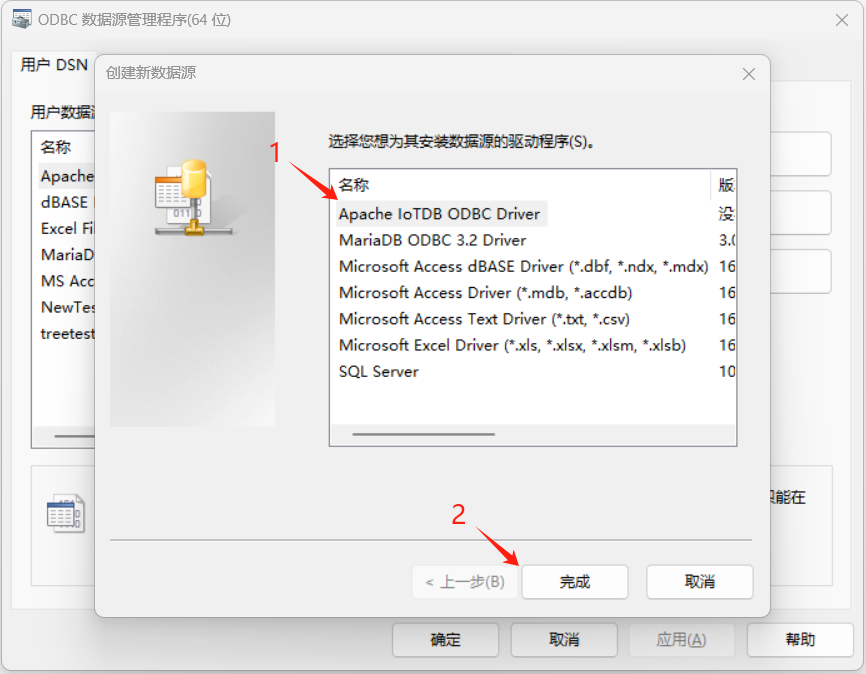
- 在弹出的驱动程序列表中选择"Apache IoTDB ODBC Driver",点击"完成"。
- 弹出数据源配置对话框,填写连接参数,随后点击 OK:
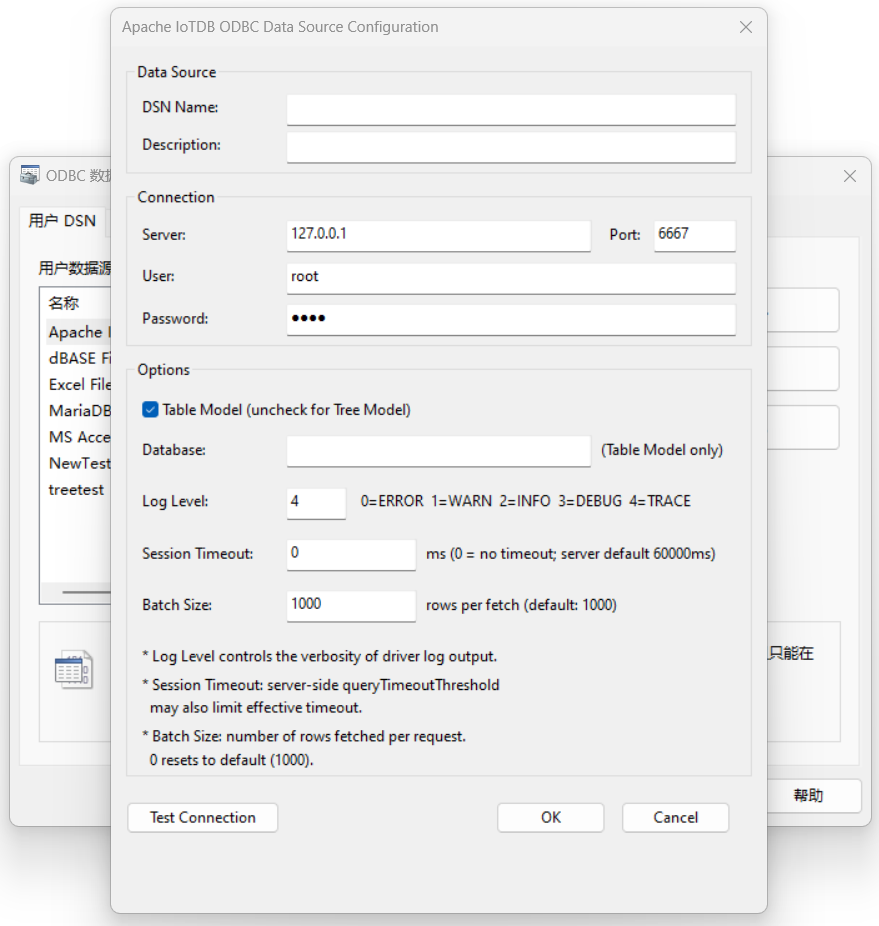
对话框中各字段的含义如下:
| 区域 | 字段 | 说明 |
|---|---|---|
| Data Source | DSN Name | 数据源名称,应用程序通过此名称引用该数据源 |
| Data Source | Description | 数据源描述(可选) |
| Connection | Server | IoTDB 服务器 IP 地址,默认 127.0.0.1 |
| Connection | Port | IoTDB Session API 端口,默认 6667 |
| Connection | User | 用户名,默认 root |
| Connection | Password | 密码,默认 root |
| Options | Table Model | 勾选时使用表模型,取消勾选时使用树模型 |
| Options | Database | 数据库名称。仅表模型模式下可用;树模型时此字段灰化不可编辑 |
| Options | Log Level | 日志级别(0-4):0=OFF, 1=ERROR, 2=WARN, 3=INFO, 4=TRACE |
| Options | Session Timeout | 会话超时时间(毫秒),0 表示不设超时。注意服务端 queryTimeoutThreshold 默认为 60000ms,超过此值需修改服务端配置 |
| Options | Batch Size | 每次拉取的行数,默认 1000。设为 0 时重置为默认值 |
- 填写完成后,可以点击"Test Connection"按钮测试连接。测试连接会使用当前填写的参数尝试连接到 IoTDB 服务器并执行
SHOW VERSION查询。连接成功时会显示服务器版本信息,失败时会显示具体的错误原因。 - 确认参数无误后,点击"OK"保存。数据源会出现在"用户 DSN"列表中,如下图中的名称为123的数据源。
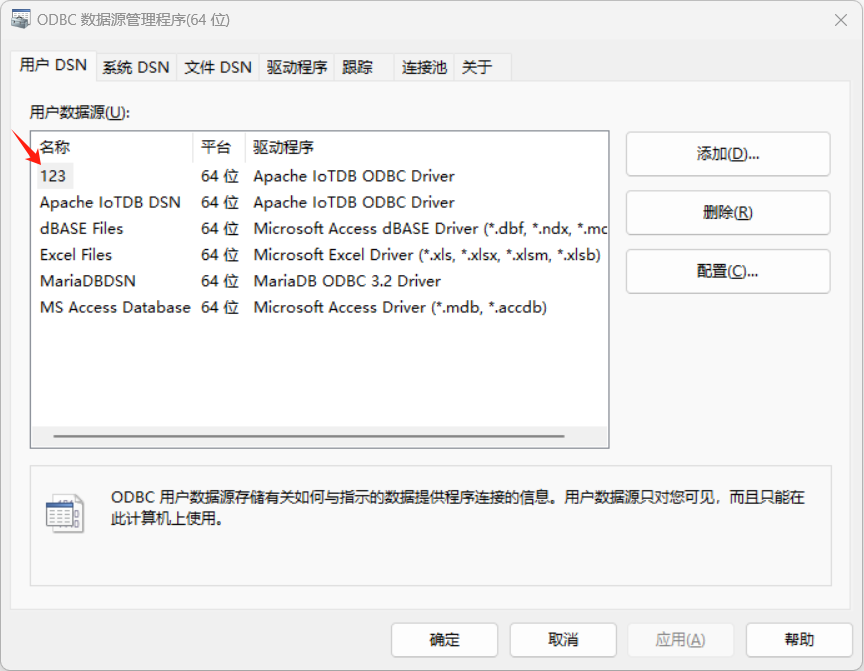
如需修改已有数据源的配置,在列表中选中后点击"配置"按钮即可重新编辑。
2.4.2 连接字符串
连接字符串格式为分号分隔的键值对,如:
Driver={IoTDB ODBC Driver};server=127.0.0.1;port=6667;uid=root;pwd=root;isTableModel=false;loglevel=2具体字段属性介绍见下表:
| 字段名称 | 说明 | 可选值 | 默认值 |
|---|---|---|---|
| DSN | 数据源名称 | 自定义数据源名 | - |
| uid | 数据库用户名 | 任意字符串 | root |
| pwd | 数据库密码 | 任意字符串 | root |
| server | IoTDB 服务器地址 | ip地址 | 127.0.0.1 |
| port | IoTDB 服务器端口 | 端口 | 6667 |
| database | 数据库名称(仅表模型模式下生效) | 任意字符串 | 空字符串 |
| loglevel | 日志级别 | 整数值(0-4) | 4(LOG_LEVEL_TRACE) |
| isTableModel / tablemodel | 是否启用表模型模式 | 布尔类型,支持多种表示方式: 1. 0, false, no, off :设置为 false; 2. 1, true, yes, on :设置为 true; 3. 其他值默认设置为 true。 | true |
| sessiontimeoutms | Session 超时时间(毫秒) | 64 位整数,默认为LLONG_MAX;设置为0时将被替换为LLONG_MAX。注意,服务端有超时设置项:private long queryTimeoutThreshold = 60000;需要修改这一项才能得到超过60秒的超时时间。 | LLONG_MAX |
| batchsize | 每次拉取数据的批量大小 | 64 位整数,默认为1000;设置为0时将被替换为1000 | 1000 |
说明:
- 字段名称不区分大小写(自动转换为小写进行比较)
- 连接字符串格式为分号分隔的键值对,如:
Driver={IoTDB ODBC Driver};server=127.0.0.1;port=6667;uid=root;pwd=root;isTableModel=false;loglevel=2 - 对于布尔类型的字段(isTableModel),支持多种表示方式
- 所有字段都是可选的,如果未指定则使用默认值
- 不支持的字段会忽略并在日志中记录警告信息,但不会影响连接
- 服务器接口默认值 6667 是 IoTDB 的 C++ Session 接口所使用的默认端口。本 ODBC 驱动使用 C++ Session 接口与 IoTDB 传递数据。如果 IoTDB 服务端的 C++ Session 接口使用的端口不是默认的,需要在 ODBC 连接字符串中作相应的更改。
2.4.3 数据源配置与连接字符串的关系
在 ODBC 数据源管理器中保存的配置,会以键值对的形式写入系统的 ODBC 数据源配置中(Windows 下对应注册表 HKEY_CURRENT_USER\SOFTWARE\ODBC\ODBC.INI)。当应用程序使用 SQLConnect 或在连接字符串中指定 DSN=数据源名称 时,驱动会从系统配置中读取这些参数。
连接字符串的优先级高于 DSN 中保存的配置。 具体规则如下:
- 如果连接字符串中包含
DSN=xxx且不包含DRIVER=...,驱动会先从系统配置中加载该 DSN 的所有参数作为基础值。 - 然后,连接字符串中显式指定的参数会覆盖 DSN 中的同名参数。
- 如果连接字符串中包含
DRIVER=...,则不会从系统配置中读取任何 DSN 参数,完全以连接字符串为准。
例如:DSN 中配置了 Server=192.168.1.100、Port=6667,但连接字符串为 DSN=MyDSN;Server=127.0.0.1,则实际连接使用 Server=127.0.0.1(连接字符串覆盖),Port=6667(来自 DSN)。
2.5 日志记录
驱动运行时的日志输出分为「驱动自身日志」和「ODBC 管理器追踪日志」两类,需注意日志等级对性能的影响。
2.5.1 驱动自身日志
- 输出位置:用户主目录下的
apache_iotdb_odbc.log; - 日志等级:通过连接字符串的
loglevel配置(0-4,等级越高输出越详细); - 性能影响:高日志等级会显著降低驱动性能,建议仅调试时使用。
2.5.2 ODBC 管理器追踪日志
- 开启方式:打开「ODBC 数据源管理器」→「跟踪」→「立即启动跟踪」;
- 注意事项:开启后会大幅降低驱动性能,仅用于问题排查。
3. 接口支持
3.1 方法列表
驱动对 ODBC 标准 API 的支持情况如下:
| ODBC/Setup API | 函数功能 | 参数列表 | 参数说明 |
|---|---|---|---|
| SQLAllocHandle | 分配ODBC句柄 | (SQLSMALLINT HandleType, SQLHANDLE InputHandle, SQLHANDLE *OutputHandle) | HandleType: 要分配的句柄类型(ENV/DBC/STMT/DESC); InputHandle: 上级上下文句柄; OutputHandle: 返回的新句柄指针 |
| SQLBindCol | 绑定列到结果缓冲区 | (SQLHSTMT StatementHandle, SQLUSMALLINT ColumnNumber, SQLSMALLINT TargetType, SQLPOINTER TargetValue, SQLLEN BufferLength, SQLLEN *StrLen_or_Ind) | StatementHandle: 语句句柄; ColumnNumber: 列号; TargetType: C数据类型; TargetValue: 数据缓冲区; BufferLength: 缓冲区长度; StrLen_or_Ind: 返回数据长度或NULL指示 |
| SQLColAttribute | 获取列属性信息 | (SQLHSTMT StatementHandle, SQLUSMALLINT ColumnNumber, SQLUSMALLINT FieldIdentifier, SQLPOINTER CharacterAttribute, SQLSMALLINT BufferLength, SQLSMALLINT *StringLength, SQLLEN *NumericAttribute) | StatementHandle: 语句句柄; ColumnNumber: 列号; FieldIdentifier: 属性ID; CharacterAttribute: 字符属性输出; BufferLength: 缓冲区长度; StringLength: 返回长度; NumericAttribute: 数值属性输出 |
| SQLColumns | 查询表列信息 | (SQLHSTMT StatementHandle, SQLCHAR *CatalogName, SQLSMALLINT NameLength1, SQLCHAR *SchemaName, SQLSMALLINT NameLength2, SQLCHAR *TableName, SQLSMALLINT NameLength3, SQLCHAR *ColumnName, SQLSMALLINT NameLength4) | StatementHandle: 语句句柄; Catalog/Schema/Table/ColumnName: 查询对象名称; NameLength*: 对应名称长度 |
| SQLConnect | 建立数据库连接 | (SQLHDBC ConnectionHandle, SQLCHAR *ServerName, SQLSMALLINT NameLength1, SQLCHAR *UserName, SQLSMALLINT NameLength2, SQLCHAR *Authentication, SQLSMALLINT NameLength3) | ConnectionHandle: 连接句柄; ServerName: 数据源名称; UserName: 用户名; Authentication: 密码;NameLength*: 字符串长度 |
| SQLDescribeCol | 描述结果集中的列 | (SQLHSTMT StatementHandle, SQLUSMALLINT ColumnNumber, SQLCHAR *ColumnName, SQLSMALLINT BufferLength, SQLSMALLINT *NameLength, SQLSMALLINT *DataType, SQLULEN *ColumnSize, SQLSMALLINT *DecimalDigits, SQLSMALLINT *Nullable) | StatementHandle: 语句句柄; ColumnNumber: 列号; ColumnName: 列名输出; BufferLength: 缓冲区长度; NameLength: 返回列名长度; DataType: SQL类型; ColumnSize: 列大小; DecimalDigits: 小数位; Nullable: 是否可为空 |
| SQLDisconnect | 断开数据库连接 | (SQLHDBC ConnectionHandle) | ConnectionHandle: 连接句柄 |
| SQLDriverConnect | 使用连接字符串建立连接 | (SQLHDBC ConnectionHandle, SQLHWND WindowHandle, SQLCHAR *InConnectionString, SQLSMALLINT StringLength1, SQLCHAR *OutConnectionString, SQLSMALLINT BufferLength, SQLSMALLINT *StringLength2, SQLUSMALLINT DriverCompletion) | ConnectionHandle: 连接句柄; WindowHandle: 窗口句柄; InConnectionString: 输入连接字符串; StringLength1: 输入长度; OutConnectionString: 输出连接字符串; BufferLength: 输出缓冲区; StringLength2: 返回长度; DriverCompletion: 连接提示方式 |
| SQLEndTran | 提交或回滚事务 | (SQLSMALLINT HandleType, SQLHANDLE Handle, SQLSMALLINT CompletionType) | HandleType: 句柄类型; Handle: 连接或环境句柄; CompletionType: 提交或回滚事务 |
| SQLExecDirect | 直接执行SQL语句 | (SQLHSTMT StatementHandle, SQLCHAR *StatementText, SQLINTEGER TextLength) | StatementHandle: 语句句柄; StatementText: SQL文本; TextLength: SQL长度 |
| SQLFetch | 提取结果集中的下一行 | (SQLHSTMT StatementHandle) | StatementHandle: 语句句柄 |
| SQLFreeHandle | 释放ODBC句柄 | (SQLSMALLINT HandleType, SQLHANDLE Handle) | HandleType: 句柄类型; Handle: 要释放的句柄 |
| SQLFreeStmt | 释放语句相关资源 | (SQLHSTMT StatementHandle, SQLUSMALLINT Option) | StatementHandle: 语句句柄; Option: 释放选项(关闭游标/重置参数等) |
| SQLGetConnectAttr | 获取连接属性 | (SQLHDBC ConnectionHandle, SQLINTEGER Attribute, SQLPOINTER Value, SQLINTEGER BufferLength, SQLINTEGER *StringLength) | ConnectionHandle: 连接句柄; Attribute: 属性ID; Value: 返回属性值; BufferLength: 缓冲区长度; StringLength: 返回长度 |
| SQLGetData | 获取结果数据 | (SQLHSTMT StatementHandle, SQLUSMALLINT Col_or_Param_Num, SQLSMALLINT TargetType, SQLPOINTER TargetValue, SQLLEN BufferLength, SQLLEN *StrLen_or_Ind) | StatementHandle: 语句句柄; Col_or_Param_Num: 列号; TargetType: C类型; TargetValue: 数据缓冲区; BufferLength: 缓冲区大小; StrLen_or_Ind: 返回长度或NULL标志 |
| SQLGetDiagField | 获取诊断字段 | (SQLSMALLINT HandleType, SQLHANDLE Handle, SQLSMALLINT RecNumber, SQLSMALLINT DiagIdentifier, SQLPOINTER DiagInfo, SQLSMALLINT BufferLength, SQLSMALLINT *StringLength) | HandleType: 句柄类型; Handle: 句柄; RecNumber: 记录号; DiagIdentifier: 诊断字段ID; DiagInfo: 输出信息; BufferLength: 缓冲区; StringLength: 返回长度 |
| SQLGetDiagRec | 获取诊断记录 | (SQLSMALLINT HandleType, SQLHANDLE Handle, SQLSMALLINT RecNumber, SQLCHAR *Sqlstate, SQLINTEGER *NativeError, SQLCHAR *MessageText, SQLSMALLINT BufferLength, SQLSMALLINT *TextLength) | HandleType: 句柄类型; Handle: 句柄; RecNumber: 记录号; Sqlstate: SQL状态码; NativeError: 原生错误码; MessageText: 错误信息; BufferLength: 缓冲区; TextLength: 返回长度 |
| SQLGetInfo | 获取数据库信息 | (SQLHDBC ConnectionHandle, SQLUSMALLINT InfoType, SQLPOINTER InfoValue, SQLSMALLINT BufferLength, SQLSMALLINT *StringLength) | ConnectionHandle: 连接句柄; InfoType: 信息类型; InfoValue: 返回值; BufferLength: 缓冲区长度; StringLength: 返回长度 |
| SQLGetStmtAttr | 获取语句属性 | (SQLHSTMT StatementHandle, SQLINTEGER Attribute, SQLPOINTER Value, SQLINTEGER BufferLength, SQLINTEGER *StringLength) | StatementHandle: 语句句柄; Attribute: 属性ID; Value: 返回值; BufferLength: 缓冲区; StringLength: 返回长度 |
| SQLGetTypeInfo | 获取数据类型信息 | (SQLHSTMT StatementHandle, SQLSMALLINT DataType) | StatementHandle: 语句句柄; DataType: SQL数据类型 |
| SQLMoreResults | 获取更多结果集 | (SQLHSTMT StatementHandle) | StatementHandle: 语句句柄 |
| SQLNumResultCols | 获取结果集列数 | (SQLHSTMT StatementHandle, SQLSMALLINT *ColumnCount) | StatementHandle: 语句句柄; ColumnCount: 返回列数 |
| SQLRowCount | 获取受影响的行数 | (SQLHSTMT StatementHandle, SQLLEN *RowCount) | StatementHandle: 语句句柄; RowCount: 返回受影响行数 |
| SQLSetConnectAttr | 设置连接属性 | (SQLHDBC ConnectionHandle, SQLINTEGER Attribute, SQLPOINTER Value, SQLINTEGER StringLength) | ConnectionHandle: 连接句柄; Attribute: 属性ID; Value: 属性值; StringLength: 属性值长度 |
| SQLSetEnvAttr | 设置环境属性 | (SQLHENV EnvironmentHandle, SQLINTEGER Attribute, SQLPOINTER Value, SQLINTEGER StringLength) | EnvironmentHandle: 环境句柄; Attribute: 属性ID; Value: 属性值; StringLength: 长度 |
| SQLSetStmtAttr | 设置语句属性 | (SQLHSTMT StatementHandle, SQLINTEGER Attribute, SQLPOINTER Value, SQLINTEGER StringLength) | StatementHandle: 语句句柄; Attribute: 属性ID; Value: 属性值; StringLength: 长度 |
| SQLTables | 查询表信息 | (SQLHSTMT StatementHandle, SQLCHAR *CatalogName, SQLSMALLINT NameLength1, SQLCHAR *SchemaName, SQLSMALLINT NameLength2, SQLCHAR *TableName, SQLSMALLINT NameLength3, SQLCHAR *TableType, SQLSMALLINT NameLength4) | StatementHandle: 语句句柄; Catalog/Schema/TableName: 表名; TableType: 表类型; NameLength*: 对应长度 |
3.2 数据类型转换
IoTDB 数据类型与 ODBC 标准数据类型的映射关系如下:
| IoTDB 数据类型 | ODBC 数据类型 |
|---|---|
| BOOLEAN | SQL_BIT |
| INT32 | SQL_INTEGER |
| INT64 | SQL_BIGINT |
| FLOAT | SQL_REAL |
| DOUBLE | SQL_DOUBLE |
| TEXT | SQL_VARCHAR |
| STRING | SQL_VARCHAR |
| BLOB | SQL_LONGVARBINARY |
| TIMESTAMP | SQL_BIGINT |
| DATE | SQL_DATE |
4. 操作示例
本章节主要介绍 C#、Python、C++、PowerBI、Excel 全类型操作示例,覆盖数据查询、插入、删除等核心操作。
4.1 C# 示例
/*******
Note: When the output contains Chinese characters, it may cause garbled text.
This is because the table.Write() function cannot output strings in UTF-8 encoding
and can only output using GB2312 (or another system default encoding). This issue
may not occur in software like Power BI; it also does not occur when using the Console.
WriteLine function. This is an issue with the ConsoleTable package.
*****/
using System.Data.Common;
using System.Data.Odbc;
using System.Reflection.PortableExecutable;
using ConsoleTables;
using System;

/// <summary>执行 SELECT 查询并以表格形式输出 root.full.fulldevice 的结果</summary>
void Query(OdbcConnection dbConnection)
{
    try
    {
        using (OdbcCommand dbCommand = dbConnection.CreateCommand())
        {
            dbCommand.CommandText = "SELECT * FROM root.full.fulldevice WHERE time >= 1735689600000 AND time <= 1735690790000";
            using (OdbcDataReader dbReader = dbCommand.ExecuteReader())
            {
                var fCount = dbReader.FieldCount;
                Console.WriteLine($"fCount = {fCount}");
                // 输出表头
                var columns = new string[fCount];
                for (var i = 0; i < fCount; i++)
                {
                    var fName = dbReader.GetName(i);
                    if (fName.Contains('.'))
                    {
                        fName = fName.Substring(fName.LastIndexOf('.') + 1);
                    }
                    columns[i] = fName;
                }
                // 输出内容
                var table = new ConsoleTable(columns);
                while (dbReader.Read())
                {
                    var row = new object[fCount];
                    for (var i = 0; i < fCount; i++)
                    {
                        if (dbReader.IsDBNull(i))
                        {
                            row[i] = null;
                            continue;
                        }
                        row[i] = dbReader.GetValue(i);
                    }
                    table.AddRow(row);
                }
                table.Write();
                Console.WriteLine();
            }
        }
    }
    catch (Exception ex)
    {
        Console.WriteLine(ex.ToString());
    }
}

/// <summary>执行非查询 SQL 语句(如 INSERT 等,树模型 INSERT 会自动创建)</summary>
void Execute(OdbcConnection dbConnection, string command)
{
    try
    {
        using (OdbcCommand dbCommand = dbConnection.CreateCommand())
        {
            try
            {
                dbCommand.CommandText = command;
                Console.WriteLine($"Execute command: {command}");
                dbCommand.ExecuteNonQuery();
            }
            catch (Exception ex)
            {
                Console.WriteLine($"CommandText error: {ex.Message}");
            }
        }
    }
    catch (OdbcException ex)
    {
        Console.WriteLine($"数据库错误:{ex.Message}");
    }
    catch (Exception ex)
    {
        Console.WriteLine($"发生未知错误:{ex.Message}");
    }
}

var dsn = "Apache IoTDB DSN";
var user = "root";
var password = "root";
var server = "127.0.0.1";
var connectionString = $"DSN={dsn};Server={server};UID={user};PWD={password};loglevel=4;istablemodel=0";

using (OdbcConnection dbConnection = new OdbcConnection(connectionString))
{
    Console.WriteLine($"Start");
    try
    {
        dbConnection.Open();
    }
    catch (Exception ex)
    {
        Console.WriteLine($"Login failed: {ex.Message}");
        Console.WriteLine($"Stack Trace: {ex.StackTrace}");
        dbConnection.Dispose();
        return;
    }
    string[] insertStatements = new string[]
    {
            "INSERT INTO root.full.fulldevice(timestamp, bool_col, int32_col, int64_col, float_col, double_col, text_col, string_col, timestamp_col, date_col) VALUES (1735689600000, true, 100, 10000000000, 36.5, 128.689, '设备运行状态正常', '设备A-机房1', 1735689600000, '2026-01-04')",
            "INSERT INTO root.full.fulldevice(timestamp, bool_col, int32_col, int64_col, float_col, double_col, text_col, string_col, timestamp_col, date_col) VALUES (1735689660000, false, 101, 10000000001, 36.6, 128.789, '设备运行状态正常', '设备A-机房1', 1735689660000, '2026-01-04')",
            "INSERT INTO root.full.fulldevice(timestamp, bool_col, int32_col, int64_col, float_col, double_col, text_col, string_col, timestamp_col, date_col) VALUES (1735689720000, true, 102, 10000000002, 36.7, 128.889, '设备运行状态正常', '设备A-机房1', 1735689720000, '2026-01-04')",
            "INSERT INTO root.full.fulldevice(timestamp, bool_col, int32_col, int64_col, float_col, double_col, text_col, string_col, timestamp_col, date_col) VALUES (1735689780000, false, 103, 10000000003, 36.8, 128.989, '设备温度偏高告警', '设备A-机房1', 1735689780000, '2026-01-04')",
            "INSERT INTO root.full.fulldevice(timestamp, bool_col, int32_col, int64_col, float_col, double_col, text_col, string_col, timestamp_col, date_col) VALUES (1735689840000, true, 104, 10000000004, 36.9, 129.089, '设备状态恢复正常', '设备A-机房1', 1735689840000, '2026-01-04')",
            "INSERT INTO root.full.fulldevice(timestamp, bool_col, int32_col, int64_col, float_col, double_col, text_col, string_col, timestamp_col, date_col) VALUES (1735689900000, false, 105, 10000000005, 37.0, 129.189, '设备运行状态正常', '设备B-机房2', 1735689900000, '2026-01-04')",
            "INSERT INTO root.full.fulldevice(timestamp, bool_col, int32_col, int64_col, float_col, double_col, text_col, string_col, timestamp_col, date_col) VALUES (1735689960000, true, 106, 10000000006, 37.1, 129.289, '设备运行状态正常', '设备B-机房2', 1735689960000, '2026-01-04')",
            "INSERT INTO root.full.fulldevice(timestamp, bool_col, int32_col, int64_col, float_col, double_col, text_col, string_col, timestamp_col, date_col) VALUES (1735690020000, false, 107, 10000000007, 37.2, 129.389, '设备湿度偏低告警', '设备B-机房2', 1735690020000, '2026-01-04')",
            "INSERT INTO root.full.fulldevice(timestamp, bool_col, int32_col, int64_col, float_col, double_col, text_col, string_col, timestamp_col, date_col) VALUES (1735690080000, true, 108, 10000000008, 37.3, 129.489, '设备状态恢复正常', '设备B-机房2', 1735690080000, '2026-01-04')",
            "INSERT INTO root.full.fulldevice(timestamp, bool_col, int32_col, int64_col, float_col, double_col, text_col, string_col, timestamp_col, date_col) VALUES (1735690140000, false, 109, 10000000009, 37.4, 129.589, '设备运行状态正常', '设备C-机房3', 1735690140000, '2026-01-04')",
            "INSERT INTO root.full.fulldevice(timestamp, bool_col, int32_col, int64_col, float_col, double_col, text_col, string_col, timestamp_col, date_col) VALUES (1735690200000, true, 110, 10000000010, 37.5, 129.689, '设备运行状态正常', '设备C-机房3', 1735690200000, '2026-01-04')",
            "INSERT INTO root.full.fulldevice(timestamp, bool_col, int32_col, int64_col, float_col, double_col, text_col, string_col, timestamp_col, date_col) VALUES (1735690260000, false, 111, 10000000011, 37.6, 129.789, '设备电压不稳告警', '设备C-机房3', 1735690260000, '2026-01-04')",
            "INSERT INTO root.full.fulldevice(timestamp, bool_col, int32_col, int64_col, float_col, double_col, text_col, string_col, timestamp_col, date_col) VALUES (1735690320000, true, 112, 10000000012, 37.7, 129.889, '设备状态恢复正常', '设备C-机房3', 1735690320000, '2026-01-04')",
            "INSERT INTO root.full.fulldevice(timestamp, bool_col, int32_col, int64_col, float_col, double_col, text_col, string_col, timestamp_col, date_col) VALUES (1735690380000, false, 113, 10000000013, 37.8, 129.989, '设备运行状态正常', '设备D-机房4', 1735690380000, '2026-01-04')",
            "INSERT INTO root.full.fulldevice(timestamp, bool_col, int32_col, int64_col, float_col, double_col, text_col, string_col, timestamp_col, date_col) VALUES (1735690440000, true, 114, 10000000014, 37.9, 130.089, '设备运行状态正常', '设备D-机房4', 1735690440000, '2026-01-04')",
            "INSERT INTO root.full.fulldevice(timestamp, bool_col, int32_col, int64_col, float_col, double_col, text_col, string_col, timestamp_col, date_col) VALUES (1735690500000, false, 115, 10000000015, 38.0, 130.189, '设备运行状态正常', '设备D-机房4', 1735690500000, '2026-01-04')",
            "INSERT INTO root.full.fulldevice(timestamp, bool_col, int32_col, int64_col, float_col, double_col, text_col, string_col, timestamp_col, date_col) VALUES (1735690560000, true, 116, 10000000016, 38.1, 130.289, '设备信号中断告警', '设备D-机房4', 1735690560000, '2026-01-04')",
            "INSERT INTO root.full.fulldevice(timestamp, bool_col, int32_col, int64_col, float_col, double_col, text_col, string_col, timestamp_col, date_col) VALUES (1735690620000, false, 117, 10000000017, 38.2, 130.389, '设备运行状态正常', '设备E-机房5', 1735690620000, '2026-01-04')",
            "INSERT INTO root.full.fulldevice(timestamp, bool_col, int32_col, int64_col, float_col, double_col, text_col, string_col, timestamp_col, date_col) VALUES (1735690680000, true, 118, 10000000018, 38.3, 130.489, '设备运行状态正常', '设备E-机房5', 1735690680000, '2026-01-04')",
            "INSERT INTO root.full.fulldevice(timestamp, bool_col, int32_col, int64_col, float_col, double_col, text_col, string_col, timestamp_col, date_col) VALUES (1735690740000, false, 119, 10000000019, 38.4, 130.589, '设备运行状态正常', '设备E-机房5', 1735690740000, '2026-01-04')",
            "INSERT INTO root.full.fulldevice(timestamp, bool_col, int32_col, int64_col, float_col, double_col, text_col, string_col, timestamp_col, date_col) VALUES (1735690790000, false, 119, 10000000019, 38.4, 130.589, '设备运行状态正常', '设备E-机房5', 1735690740000, '2026-01-04')"
    };
    foreach (var insert in insertStatements)
    {
        Execute(dbConnection, insert);
    }
    Console.WriteLine($"[DEBUG] Inserted {insertStatements.Length} rows. Begin to query.");

    Query(dbConnection); // 执行查询并输出结果
}
4.2 Python 示例
- 通过Python访问odbc,需安装pyodbc包
pip install pyodbc- 完整代码
#!/usr/bin/env python3
# -*- coding: utf-8 -*-
"""
Apache IoTDB ODBC Python 示例 - 树模型(Tree Model)
使用 pyodbc 连接 IoTDB ODBC 驱动,通过 istablemodel=0 使用树模型。
功能参考 examples/BasicTest/TreeTest/TreeTest.cs 和 examples/cpp-example/TreeTest.cpp。
"""

import pyodbc

def execute(conn: pyodbc.Connection, command: str) -> None:
    """执行非查询 SQL 语句(如 INSERT 等,树模型 INSERT 会自动创建)"""
    try:
        with conn.cursor() as cursor:
            cursor.execute(command)
            cmd_upper = command.strip().upper()
            if cmd_upper.startswith(("INSERT", "UPDATE", "DELETE")):
                conn.commit()
            print(f"Execute command: {command}")
    except pyodbc.Error as ex:
        print(f"CommandText error: {ex}")

def query(conn: pyodbc.Connection, sql: str) -> None:
    """执行 SELECT 查询并以表格形式输出 root.full.fulldevice 的结果"""
    try:
        with conn.cursor() as cursor:
            cursor.execute(sql)
            col_count = len(cursor.description)
            print(f"fCount = {col_count}")

            if col_count <= 0:
                return

            columns = []
            for i in range(col_count):
                col_name = cursor.description[i][0] or f"Column{i}"
                if "." in str(col_name):
                    col_name = str(col_name).split(".")[-1]
                columns.append(str(col_name))

            rows = cursor.fetchall()

            col_widths = [max(len(str(col)), 4) for col in columns]
            for row in rows:
                for j, val in enumerate(row):
                    if j < len(col_widths):
                        col_widths[j] = max(col_widths[j], len(str(val) if val is not None else "NULL"))

            header = " | ".join(str(c).ljust(col_widths[i]) for i, c in enumerate(columns))
            print(header)
            print("-" * len(header))

            for row in rows:
                values = []
                for i, val in enumerate(row):
                    if val is None:
                        cell = "NULL"
                    else:
                        cell = str(val)
                    values.append(cell.ljust(col_widths[i]) if i < len(col_widths) else cell)
                print(" | ".join(values))

            print()

    except pyodbc.Error as ex:
        print(f"Query error: {ex}")

def main() -> None:
    dsn = "Apache IoTDB DSN"
    user = "root"
    password = "root"
    server = "127.0.0.1"
    connection_string = (
        f"DSN={dsn};Server={server};UID={user};PWD={password};"
        f"loglevel=4;istablemodel=0"
    )

    print("Start")

    try:
        conn = pyodbc.connect(connection_string)
    except pyodbc.Error as ex:
        print(f"Login failed: {ex}")
        return

    try:
        driver_name = conn.getinfo(6)  # SQL_DRIVER_NAME
        print(f"Successfully opened connection. driver = {driver_name}")
    except Exception:
        print("Successfully opened connection.")

    try:
        insert_statements = [
            "INSERT INTO root.full.fulldevice(timestamp, bool_col, int32_col, int64_col, float_col, double_col, text_col, string_col, timestamp_col, date_col) VALUES (1735689600001, true, 100, 10000000000, 36.5, 128.689, '设备运行状态正常', '设备A-机房1', 1735689600000, '2026-01-04')",
            "INSERT INTO root.full.fulldevice(timestamp, bool_col, int32_col, int64_col, float_col, double_col, text_col, string_col, timestamp_col, date_col) VALUES (1735689660000, false, 101, 10000000001, 36.6, 128.789, '设备运行状态正常', '设备A-机房1', 1735689660000, '2026-01-04')",
            "INSERT INTO root.full.fulldevice(timestamp, bool_col, int32_col, int64_col, float_col, double_col, text_col, string_col, timestamp_col, date_col) VALUES (1735689720000, true, 102, 10000000002, 36.7, 128.889, '设备运行状态正常', '设备A-机房1', 1735689720000, '2026-01-04')",
            "INSERT INTO root.full.fulldevice(timestamp, bool_col, int32_col, int64_col, float_col, double_col, text_col, string_col, timestamp_col, date_col) VALUES (1735689780000, false, 103, 10000000003, 36.8, 128.989, '设备温度偏高告警', '设备A-机房1', 1735689780000, '2026-01-04')",
            "INSERT INTO root.full.fulldevice(timestamp, bool_col, int32_col, int64_col, float_col, double_col, text_col, string_col, timestamp_col, date_col) VALUES (1735689840000, true, 104, 10000000004, 36.9, 129.089, '设备状态恢复正常', '设备A-机房1', 1735689840000, '2026-01-04')",
            "INSERT INTO root.full.fulldevice(timestamp, bool_col, int32_col, int64_col, float_col, double_col, text_col, string_col, timestamp_col, date_col) VALUES (1735689900000, false, 105, 10000000005, 37.0, 129.189, '设备运行状态正常', '设备B-机房2', 1735689900000, '2026-01-04')",
            "INSERT INTO root.full.fulldevice(timestamp, bool_col, int32_col, int64_col, float_col, double_col, text_col, string_col, timestamp_col, date_col) VALUES (1735689960000, true, 106, 10000000006, 37.1, 129.289, '设备运行状态正常', '设备B-机房2', 1735689960000, '2026-01-04')",
            "INSERT INTO root.full.fulldevice(timestamp, bool_col, int32_col, int64_col, float_col, double_col, text_col, string_col, timestamp_col, date_col) VALUES (1735690020000, false, 107, 10000000007, 37.2, 129.389, '设备湿度偏低告警', '设备B-机房2', 1735690020000, '2026-01-04')",
            "INSERT INTO root.full.fulldevice(timestamp, bool_col, int32_col, int64_col, float_col, double_col, text_col, string_col, timestamp_col, date_col) VALUES (1735690080000, true, 108, 10000000008, 37.3, 129.489, '设备状态恢复正常', '设备B-机房2', 1735690080000, '2026-01-04')",
            "INSERT INTO root.full.fulldevice(timestamp, bool_col, int32_col, int64_col, float_col, double_col, text_col, string_col, timestamp_col, date_col) VALUES (1735690140000, false, 109, 10000000009, 37.4, 129.589, '设备运行状态正常', '设备C-机房3', 1735690140000, '2026-01-04')",
            "INSERT INTO root.full.fulldevice(timestamp, bool_col, int32_col, int64_col, float_col, double_col, text_col, string_col, timestamp_col, date_col) VALUES (1735690200000, true, 110, 10000000010, 37.5, 129.689, '设备运行状态正常', '设备C-机房3', 1735690200000, '2026-01-04')",
            "INSERT INTO root.full.fulldevice(timestamp, bool_col, int32_col, int64_col, float_col, double_col, text_col, string_col, timestamp_col, date_col) VALUES (1735690260000, false, 111, 10000000011, 37.6, 129.789, '设备电压不稳告警', '设备C-机房3', 1735690260000, '2026-01-04')",
            "INSERT INTO root.full.fulldevice(timestamp, bool_col, int32_col, int64_col, float_col, double_col, text_col, string_col, timestamp_col, date_col) VALUES (1735690320000, true, 112, 10000000012, 37.7, 129.889, '设备状态恢复正常', '设备C-机房3', 1735690320000, '2026-01-04')",
            "INSERT INTO root.full.fulldevice(timestamp, bool_col, int32_col, int64_col, float_col, double_col, text_col, string_col, timestamp_col, date_col) VALUES (1735690380000, false, 113, 10000000013, 37.8, 129.989, '设备运行状态正常', '设备D-机房4', 1735690380000, '2026-01-04')",
            "INSERT INTO root.full.fulldevice(timestamp, bool_col, int32_col, int64_col, float_col, double_col, text_col, string_col, timestamp_col, date_col) VALUES (1735690440000, true, 114, 10000000014, 37.9, 130.089, '设备运行状态正常', '设备D-机房4', 1735690440000, '2026-01-04')",
            "INSERT INTO root.full.fulldevice(timestamp, bool_col, int32_col, int64_col, float_col, double_col, text_col, string_col, timestamp_col, date_col) VALUES (1735690500000, false, 115, 10000000015, 38.0, 130.189, '设备运行状态正常', '设备D-机房4', 1735690500000, '2026-01-04')",
            "INSERT INTO root.full.fulldevice(timestamp, bool_col, int32_col, int64_col, float_col, double_col, text_col, string_col, timestamp_col, date_col) VALUES (1735690560000, true, 116, 10000000016, 38.1, 130.289, '设备信号中断告警', '设备D-机房4', 1735690560000, '2026-01-04')",
            "INSERT INTO root.full.fulldevice(timestamp, bool_col, int32_col, int64_col, float_col, double_col, text_col, string_col, timestamp_col, date_col) VALUES (1735690620000, false, 117, 10000000017, 38.2, 130.389, '设备运行状态正常', '设备E-机房5', 1735690620000, '2026-01-04')",
            "INSERT INTO root.full.fulldevice(timestamp, bool_col, int32_col, int64_col, float_col, double_col, text_col, string_col, timestamp_col, date_col) VALUES (1735690680000, true, 118, 10000000018, 38.3, 130.489, '设备运行状态正常', '设备E-机房5', 1735690680000, '2026-01-04')",
            "INSERT INTO root.full.fulldevice(timestamp, bool_col, int32_col, int64_col, float_col, double_col, text_col, string_col, timestamp_col, date_col) VALUES (1735690740000, false, 119, 10000000019, 38.4, 130.589, '设备运行状态正常', '设备E-机房5', 1735690740000, '2026-01-04')",
            "INSERT INTO root.full.fulldevice(timestamp, bool_col, int32_col, int64_col, float_col, double_col, text_col, string_col, timestamp_col, date_col) VALUES (1735690790000, false, 119, 10000000019, 38.4, 130.589, '设备运行状态正常', '设备E-机房5', 1735690740000, '2026-01-04')",
        ]
        for insert_sql in insert_statements:
            execute(conn, insert_sql)
        print(f"[DEBUG] Inserted {len(insert_statements)} rows. Begin to query.")

        query_sql = "SELECT * FROM root.full.fulldevice WHERE time >= 1735689600000 AND time <= 1735690790000"
        query(conn, query_sql)
        print("Query ok")
    finally:
        conn.close()

if __name__ == "__main__":
    main()
4.3 C++ 示例
#define WIN32_LEAN_AND_MEAN
#include <windows.h>
#include <sql.h>
#include <sqlext.h>
#include <iostream>
#include <string>
#include <vector>
#include <chrono>
#include <ctime>
#ifndef SQL_DIAG_COLUMN_SIZE
#define SQL_DIAG_COLUMN_SIZE 33L
#endif
void CheckOdbcError(SQLRETURN retCode, SQLSMALLINT handleType, SQLHANDLE handle, const char* functionName) {
if (retCode == SQL_SUCCESS || retCode == SQL_SUCCESS_WITH_INFO) {
return;
}
SQLCHAR sqlState[6];
SQLCHAR message[SQL_MAX_MESSAGE_LENGTH];
SQLINTEGER nativeError;
SQLSMALLINT textLength;
SQLRETURN errRet;
errRet = SQLGetDiagRec(handleType, handle, 1, sqlState, &nativeError, message, sizeof(message), &textLength);
std::cerr << "ODBC Error in " << functionName << ":\n";
std::cerr << " SQL State: " << sqlState << "\n";
std::cerr << " Native Error: " << nativeError << "\n";
std::cerr << " Message: " << message << "\n";
std::cerr << " SQLGetDiagRec Return: " << errRet << "\n";
if (retCode == SQL_ERROR || retCode == SQL_INVALID_HANDLE) {
exit(1);
}
}
void PrintSimpleTable(const std::vector<std::string>& headers,
const std::vector<std::vector<std::string>>& rows) {
for (size_t i = 0; i < headers.size(); i++) {
std::cout << headers[i];
if (i < headers.size() - 1) std::cout << "\t";
}
std::cout << std::endl;
for (size_t i = 0; i < headers.size(); i++) {
std::cout << "----------------";
if (i < headers.size() - 1) std::cout << "\t";
}
std::cout << std::endl;
for (const auto& row : rows) {
for (size_t i = 0; i < row.size(); i++) {
std::cout << row[i];
if (i < row.size() - 1) std::cout << "\t";
}
std::cout << std::endl;
}
std::cout << std::endl;
}
/// 执行 SELECT 查询并以表格形式输出 root.full.fulldevice 的结果
void Query(SQLHDBC hDbc) {
SQLHSTMT hStmt = SQL_NULL_HSTMT;
SQLRETURN ret = SQL_SUCCESS;
try {
ret = SQLAllocHandle(SQL_HANDLE_STMT, hDbc, &hStmt);
if (!SQL_SUCCEEDED(ret)) {
CheckOdbcError(ret, SQL_HANDLE_DBC, hDbc, "SQLAllocHandle(SQL_HANDLE_STMT)");
return;
}
const std::string sqlQuery = "SELECT * FROM root.full.fulldevice WHERE time >= 1735689600000 AND time <= 1735690790000";
std::cout << "Execute query: " << sqlQuery << std::endl;
ret = SQLExecDirect(hStmt, reinterpret_cast<SQLCHAR*>(const_cast<char*>(sqlQuery.c_str())), SQL_NTS);
if (!SQL_SUCCEEDED(ret)) {
if (ret != SQL_NO_DATA) {
CheckOdbcError(ret, SQL_HANDLE_STMT, hStmt, "SQLExecDirect(SELECT)");
}
SQLFreeHandle(SQL_HANDLE_STMT, hStmt);
return;
}
SQLSMALLINT colCount = 0;
ret = SQLNumResultCols(hStmt, &colCount);
if (!SQL_SUCCEEDED(ret)) {
CheckOdbcError(ret, SQL_HANDLE_STMT, hStmt, "SQLNumResultCols");
SQLFreeHandle(SQL_HANDLE_STMT, hStmt);
return;
}
std::cout << "Column count = " << colCount << std::endl;
if (colCount <= 0) {
SQLFreeHandle(SQL_HANDLE_STMT, hStmt);
return;
}
std::vector<std::string> columnNames;
std::vector<SQLSMALLINT> columnTypes(colCount);
std::vector<SQLULEN> columnSizes(colCount);
std::vector<SQLSMALLINT> decimalDigits(colCount);
std::vector<SQLSMALLINT> nullable(colCount);
// Get basic column information
for (SQLSMALLINT i = 1; i <= colCount; i++) {
SQLSMALLINT nameLength = 0;
ret = SQLDescribeCol(hStmt, i, NULL, 0, &nameLength, NULL, NULL, NULL, NULL);
if (!SQL_SUCCEEDED(ret)) {
CheckOdbcError(ret, SQL_HANDLE_STMT, hStmt, "SQLDescribeCol (get length)");
SQLFreeHandle(SQL_HANDLE_STMT, hStmt);
return;
}
std::vector<SQLCHAR> colNameBuffer(nameLength + 1);
SQLSMALLINT actualNameLength = 0;
ret = SQLDescribeCol(hStmt, i, colNameBuffer.data(), nameLength + 1,
&actualNameLength, NULL, NULL, NULL, NULL);
if (!SQL_SUCCEEDED(ret)) {
CheckOdbcError(ret, SQL_HANDLE_STMT, hStmt, "SQLDescribeCol (get name)");
SQLFreeHandle(SQL_HANDLE_STMT, hStmt);
return;
}
std::string fullName(reinterpret_cast<char*>(colNameBuffer.data()));
size_t pos = fullName.find_last_of('.');
if (pos != std::string::npos) {
columnNames.push_back(fullName.substr(pos + 1));
} else {
columnNames.push_back(fullName);
}
ret = SQLDescribeCol(hStmt, i, NULL, 0, NULL, &columnTypes[i-1],
&columnSizes[i-1], &decimalDigits[i-1], &nullable[i-1]);
if (!SQL_SUCCEEDED(ret)) {
CheckOdbcError(ret, SQL_HANDLE_STMT, hStmt, "SQLDescribeCol (get type info)");
SQLFreeHandle(SQL_HANDLE_STMT, hStmt);
return;
}
}
std::vector<std::vector<std::string>> tableRows;
int rowCount = 0;
// Get data front every row
while (true) {
ret = SQLFetch(hStmt);
if (ret == SQL_NO_DATA) {
break;
}
if (!SQL_SUCCEEDED(ret)) {
CheckOdbcError(ret, SQL_HANDLE_STMT, hStmt, "SQLFetch");
break;
}
std::vector<std::string> row;
for (SQLSMALLINT i = 1; i <= colCount; i++) {
SQLLEN indicator = 0;
std::string valueStr;
SQLSMALLINT cType;
size_t bufferSize;
bool isCharacterType = false;
const int maxBufferSize = 32768;
switch (columnTypes[i-1]) {
case SQL_CHAR:
case SQL_VARCHAR:
case SQL_LONGVARCHAR:
case SQL_WCHAR:
case SQL_WVARCHAR:
case SQL_WLONGVARCHAR:
cType = SQL_C_CHAR;
if (columnSizes[i - 1] > 0) {
bufferSize = min(maxBufferSize, static_cast<size_t>(columnSizes[i-1]) * 4 + 1);
} else {
bufferSize = maxBufferSize;
}
isCharacterType = true;
break;
case SQL_DECIMAL:
case SQL_NUMERIC:
cType = SQL_C_CHAR;
if (columnSizes[i - 1] > 0) {
bufferSize = min(maxBufferSize, static_cast<size_t>(columnSizes[i-1]) * 4 + 1);
} else {
bufferSize = maxBufferSize;
}
isCharacterType = true;
break;
case SQL_INTEGER:
case SQL_SMALLINT:
case SQL_TINYINT:
case SQL_BIGINT:
cType = SQL_C_SBIGINT;
bufferSize = sizeof(SQLBIGINT);
break;
case SQL_REAL:
case SQL_FLOAT:
case SQL_DOUBLE:
cType = SQL_C_DOUBLE;
bufferSize = sizeof(double);
break;
case SQL_BIT:
cType = SQL_C_BIT;
bufferSize = sizeof(SQLCHAR);
break;
case SQL_DATE:
case SQL_TYPE_DATE:
cType = SQL_C_DATE;
bufferSize = sizeof(SQL_DATE_STRUCT);
break;
case SQL_TIME:
case SQL_TYPE_TIME:
cType = SQL_C_TIME;
bufferSize = sizeof(SQL_TIME_STRUCT);
break;
case SQL_TIMESTAMP:
case SQL_TYPE_TIMESTAMP:
cType = SQL_C_TIMESTAMP;
bufferSize = sizeof(SQL_TIMESTAMP_STRUCT);
break;
default:
cType = SQL_C_CHAR;
bufferSize = 256;
isCharacterType = true;
break;
}
std::vector<BYTE> buffer(bufferSize);
ret = SQLGetData(hStmt, i, cType, buffer.data(), bufferSize, &indicator);
if (indicator == SQL_NULL_DATA) {
valueStr = "NULL";
}
else if (ret != SQL_SUCCESS) {
valueStr = "ERR_CONV";
}
else {
if (cType == SQL_C_CHAR) {
valueStr = reinterpret_cast<char*>(buffer.data());
}
else if (cType == SQL_C_SBIGINT) {
SQLBIGINT intVal = *reinterpret_cast<SQLBIGINT*>(buffer.data());
valueStr = std::to_string(intVal);
}
else if (cType == SQL_C_DOUBLE) {
double doubleVal = *reinterpret_cast<double*>(buffer.data());
valueStr = std::to_string(doubleVal);
}
else if (cType == SQL_C_BIT) {
valueStr = (*buffer.data() != 0) ? "TRUE" : "FALSE";
}
else if (cType == SQL_C_DATE) {
SQL_DATE_STRUCT* date = reinterpret_cast<SQL_DATE_STRUCT*>(buffer.data());
char dateStr[20];
snprintf(dateStr, sizeof(dateStr), "%04d-%02d-%02d",
date->year, date->month, date->day);
valueStr = dateStr;
}
else if (cType == SQL_C_TIME) {
SQL_TIME_STRUCT* time = reinterpret_cast<SQL_TIME_STRUCT*>(buffer.data());
char timeStr[15];
snprintf(timeStr, sizeof(timeStr), "%02d:%02d:%02d",
time->hour, time->minute, time->second);
valueStr = timeStr;
}
else if (cType == SQL_C_TIMESTAMP) {
SQL_TIMESTAMP_STRUCT* ts = reinterpret_cast<SQL_TIMESTAMP_STRUCT*>(buffer.data());
char tsStr[30];
snprintf(tsStr, sizeof(tsStr), "%04d-%02d-%02d %02d:%02d:%02d.%06d",
ts->year, ts->month, ts->day,
ts->hour, ts->minute, ts->second,
ts->fraction / 1000);
valueStr = tsStr;
}
else {
valueStr = "UNKNOWN_TYPE";
}
if (isCharacterType && ret == SQL_SUCCESS_WITH_INFO) {
SQLLEN actualSize = 0;
SQLGetDiagField(SQL_HANDLE_STMT, hStmt, 0, SQL_DIAG_COLUMN_SIZE,
&actualSize, SQL_IS_INTEGER, NULL);
if (indicator > 0 && static_cast<size_t>(indicator) > bufferSize - 1) {
valueStr += "...";
}
}
}
row.push_back(valueStr);
}
tableRows.push_back(row);
}
if (!tableRows.empty()) {
PrintSimpleTable(columnNames, tableRows);
}
SQLFreeHandle(SQL_HANDLE_STMT, hStmt);
}
catch (const std::exception& ex) {
std::cerr << "Exception: " << ex.what() << std::endl;
if (hStmt != SQL_NULL_HSTMT) {
SQLFreeHandle(SQL_HANDLE_STMT, hStmt);
}
throw;
}
catch (...) {
std::cerr << "Unknown exception occurred" << std::endl;
if (hStmt != SQL_NULL_HSTMT) {
SQLFreeHandle(SQL_HANDLE_STMT, hStmt);
}
throw;
}
}
/// 执行非查询 SQL 语句(如 INSERT 等,树模型 INSERT 会自动创建)
void Execute(SQLHDBC hDbc, const std::string& command) {
SQLHSTMT hStmt = SQL_NULL_HSTMT;
SQLRETURN ret;
try {
ret = SQLAllocHandle(SQL_HANDLE_STMT, hDbc, &hStmt);
CheckOdbcError(ret, SQL_HANDLE_DBC, hDbc, "SQLAllocHandle(SQL_HANDLE_STMT)");
ret = SQLExecDirect(hStmt, (SQLCHAR*)command.c_str(), SQL_NTS);
if (ret != SQL_SUCCESS && ret != SQL_SUCCESS_WITH_INFO) {
CheckOdbcError(ret, SQL_HANDLE_STMT, hStmt, "SQLExecDirect");
}
SQLFreeHandle(SQL_HANDLE_STMT, hStmt);
}
catch (...) {
if (hStmt != SQL_NULL_HSTMT) {
SQLFreeHandle(SQL_HANDLE_STMT, hStmt);
}
throw;
}
}
int main() {
SQLHENV hEnv = SQL_NULL_HENV;
SQLHDBC hDbc = SQL_NULL_HDBC;
SQLRETURN ret;
try {
std::cout << "Start" << std::endl;
ret = SQLAllocHandle(SQL_HANDLE_ENV, SQL_NULL_HANDLE, &hEnv);
CheckOdbcError(ret, SQL_HANDLE_ENV, hEnv, "SQLAllocHandle(SQL_HANDLE_ENV)");
ret = SQLSetEnvAttr(hEnv, SQL_ATTR_ODBC_VERSION, (SQLPOINTER)SQL_OV_ODBC3, 0);
CheckOdbcError(ret, SQL_HANDLE_ENV, hEnv, "SQLSetEnvAttr");
ret = SQLAllocHandle(SQL_HANDLE_DBC, hEnv, &hDbc);
CheckOdbcError(ret, SQL_HANDLE_ENV, hEnv, "SQLAllocHandle(SQL_HANDLE_DBC)");
std::string dsn = "Apache IoTDB DSN";
std::string user = "root";
std::string password = "root";
std::string server = "127.0.0.1";
std::string connectionString = "DSN=" + dsn + ";Server=" + server +
";UID=" + user + ";PWD=" + password +
";loglevel=4;istablemodel=0";
std::cout << "Using connection string: " << connectionString << std::endl;
SQLCHAR outConnStr[1024];
SQLSMALLINT outConnStrLen;
ret = SQLDriverConnect(hDbc, NULL,
(SQLCHAR*)connectionString.c_str(), SQL_NTS,
outConnStr, sizeof(outConnStr),
&outConnStrLen, SQL_DRIVER_COMPLETE);
if (ret != SQL_SUCCESS && ret != SQL_SUCCESS_WITH_INFO) {
std::cerr << "Login failed" << std::endl;
CheckOdbcError(ret, SQL_HANDLE_DBC, hDbc, "SQLDriverConnect");
return 1;
}
SQLCHAR driverName[256];
SQLSMALLINT nameLength;
ret = SQLGetInfo(hDbc, SQL_DRIVER_NAME, driverName, sizeof(driverName), &nameLength);
CheckOdbcError(ret, SQL_HANDLE_DBC, hDbc, "SQLGetInfo");
std::cout << "Successfully opened connection. database name = " << driverName << std::endl;
const char* insertStatements[] = {
"INSERT INTO root.full.fulldevice(timestamp, bool_col, int32_col, int64_col, float_col, double_col, text_col, string_col, timestamp_col, date_col) VALUES (1735689600000, true, 100, 10000000000, 36.5, 128.689, '设备运行状态正常', '设备A-机房1', 1735689600000, '2026-01-04')",
"INSERT INTO root.full.fulldevice(timestamp, bool_col, int32_col, int64_col, float_col, double_col, text_col, string_col, timestamp_col, date_col) VALUES (1735689660000, false, 101, 10000000001, 36.6, 128.789, '设备运行状态正常', '设备A-机房1', 1735689660000, '2026-01-04')",
"INSERT INTO root.full.fulldevice(timestamp, bool_col, int32_col, int64_col, float_col, double_col, text_col, string_col, timestamp_col, date_col) VALUES (1735689720000, true, 102, 10000000002, 36.7, 128.889, '设备运行状态正常', '设备A-机房1', 1735689720000, '2026-01-04')",
"INSERT INTO root.full.fulldevice(timestamp, bool_col, int32_col, int64_col, float_col, double_col, text_col, string_col, timestamp_col, date_col) VALUES (1735689780000, false, 103, 10000000003, 36.8, 128.989, '设备温度偏高告警', '设备A-机房1', 1735689780000, '2026-01-04')",
"INSERT INTO root.full.fulldevice(timestamp, bool_col, int32_col, int64_col, float_col, double_col, text_col, string_col, timestamp_col, date_col) VALUES (1735689840000, true, 104, 10000000004, 36.9, 129.089, '设备状态恢复正常', '设备A-机房1', 1735689840000, '2026-01-04')",
"INSERT INTO root.full.fulldevice(timestamp, bool_col, int32_col, int64_col, float_col, double_col, text_col, string_col, timestamp_col, date_col) VALUES (1735689900000, false, 105, 10000000005, 37.0, 129.189, '设备运行状态正常', '设备B-机房2', 1735689900000, '2026-01-04')",
"INSERT INTO root.full.fulldevice(timestamp, bool_col, int32_col, int64_col, float_col, double_col, text_col, string_col, timestamp_col, date_col) VALUES (1735689960000, true, 106, 10000000006, 37.1, 129.289, '设备运行状态正常', '设备B-机房2', 1735689960000, '2026-01-04')",
"INSERT INTO root.full.fulldevice(timestamp, bool_col, int32_col, int64_col, float_col, double_col, text_col, string_col, timestamp_col, date_col) VALUES (1735690020000, false, 107, 10000000007, 37.2, 129.389, '设备湿度偏低告警', '设备B-机房2', 1735690020000, '2026-01-04')",
"INSERT INTO root.full.fulldevice(timestamp, bool_col, int32_col, int64_col, float_col, double_col, text_col, string_col, timestamp_col, date_col) VALUES (1735690080000, true, 108, 10000000008, 37.3, 129.489, '设备状态恢复正常', '设备B-机房2', 1735690080000, '2026-01-04')",
"INSERT INTO root.full.fulldevice(timestamp, bool_col, int32_col, int64_col, float_col, double_col, text_col, string_col, timestamp_col, date_col) VALUES (1735690140000, false, 109, 10000000009, 37.4, 129.589, '设备运行状态正常', '设备C-机房3', 1735690140000, '2026-01-04')",
"INSERT INTO root.full.fulldevice(timestamp, bool_col, int32_col, int64_col, float_col, double_col, text_col, string_col, timestamp_col, date_col) VALUES (1735690200000, true, 110, 10000000010, 37.5, 129.689, '设备运行状态正常', '设备C-机房3', 1735690200000, '2026-01-04')",
"INSERT INTO root.full.fulldevice(timestamp, bool_col, int32_col, int64_col, float_col, double_col, text_col, string_col, timestamp_col, date_col) VALUES (1735690260000, false, 111, 10000000011, 37.6, 129.789, '设备电压不稳告警', '设备C-机房3', 1735690260000, '2026-01-04')",
"INSERT INTO root.full.fulldevice(timestamp, bool_col, int32_col, int64_col, float_col, double_col, text_col, string_col, timestamp_col, date_col) VALUES (1735690320000, true, 112, 10000000012, 37.7, 129.889, '设备状态恢复正常', '设备C-机房3', 1735690320000, '2026-01-04')",
"INSERT INTO root.full.fulldevice(timestamp, bool_col, int32_col, int64_col, float_col, double_col, text_col, string_col, timestamp_col, date_col) VALUES (1735690380000, false, 113, 10000000013, 37.8, 129.989, '设备运行状态正常', '设备D-机房4', 1735690380000, '2026-01-04')",
"INSERT INTO root.full.fulldevice(timestamp, bool_col, int32_col, int64_col, float_col, double_col, text_col, string_col, timestamp_col, date_col) VALUES (1735690440000, true, 114, 10000000014, 37.9, 130.089, '设备运行状态正常', '设备D-机房4', 1735690440000, '2026-01-04')",
"INSERT INTO root.full.fulldevice(timestamp, bool_col, int32_col, int64_col, float_col, double_col, text_col, string_col, timestamp_col, date_col) VALUES (1735690500000, false, 115, 10000000015, 38.0, 130.189, '设备运行状态正常', '设备D-机房4', 1735690500000, '2026-01-04')",
"INSERT INTO root.full.fulldevice(timestamp, bool_col, int32_col, int64_col, float_col, double_col, text_col, string_col, timestamp_col, date_col) VALUES (1735690560000, true, 116, 10000000016, 38.1, 130.289, '设备信号中断告警', '设备D-机房4', 1735690560000, '2026-01-04')",
"INSERT INTO root.full.fulldevice(timestamp, bool_col, int32_col, int64_col, float_col, double_col, text_col, string_col, timestamp_col, date_col) VALUES (1735690620000, false, 117, 10000000017, 38.2, 130.389, '设备运行状态正常', '设备E-机房5', 1735690620000, '2026-01-04')",
"INSERT INTO root.full.fulldevice(timestamp, bool_col, int32_col, int64_col, float_col, double_col, text_col, string_col, timestamp_col, date_col) VALUES (1735690680000, true, 118, 10000000018, 38.3, 130.489, '设备运行状态正常', '设备E-机房5', 1735690680000, '2026-01-04')",
"INSERT INTO root.full.fulldevice(timestamp, bool_col, int32_col, int64_col, float_col, double_col, text_col, string_col, timestamp_col, date_col) VALUES (1735690740000, false, 119, 10000000019, 38.4, 130.589, '设备运行状态正常', '设备E-机房5', 1735690740000, '2026-01-04')",
"INSERT INTO root.full.fulldevice(timestamp, bool_col, int32_col, int64_col, float_col, double_col, text_col, string_col, timestamp_col, date_col) VALUES (1735690790000, false, 119, 10000000019, 38.4, 130.589, '设备运行状态正常', '设备E-机房5', 1735690740000, '2026-01-04')"
};
for (const char* sql : insertStatements) {
Execute(hDbc, sql);
}
std::cout << "[DEBUG] Inserted 20 rows. Begin to query." << std::endl;
Query(hDbc);
std::cout << "Query ok" << std::endl;
SQLDisconnect(hDbc);
SQLFreeHandle(SQL_HANDLE_DBC, hDbc);
SQLFreeHandle(SQL_HANDLE_ENV, hEnv);
return 0;
}
catch (...) {
if (hDbc != SQL_NULL_HDBC) {
SQLDisconnect(hDbc);
SQLFreeHandle(SQL_HANDLE_DBC, hDbc);
}
if (hEnv != SQL_NULL_HENV) {
SQLFreeHandle(SQL_HANDLE_ENV, hEnv);
}
std::cerr << "Unexpected error!" << std::endl;
return 1;
}
}4.4 PowerBI 示例
- 打开 PowerBI Desktop,创建新项目;
- 点击「主页」→「获取数据」→「更多...」→「ODBC」→ 点击「连接」按钮;
- 数据源选择:在弹出窗口中选择「数据源名称 (DSN)」,下拉选择
Apache IoTDB DSN; - 高级配置:
- 点击「高级选项」,在「连接字符串」输入框填写配置(样例):
server=127.0.0.1;port=6667;isTableModel=false;loglevel=4说明:
dsn项可选,填写 / 不填写均不影响连接;loglevel分为 0-4 等级:0 级(ERROR)日志最少,4 级(TRACE)日志最详细,按需设置;server/dsn/loglevel大小写不敏感(如可写为Server);- 如果在DSN中配置了相关信息,则可以不填写任何配置信息,驱动管理器会自动使用在DSN中填入的配置信息。
- 身份验证:输入用户名(默认
root)和密码(默认root),点击「连接」; - 数据加载:点击「加载」即可查看数据。
4.5 Excel 示例
- 打开 Excel,创建空白工作簿;
- 点击「数据」选项卡 →「自其他来源」→「来自数据连接向导」;
- 数据源选择:选择「ODBC DSN」→ 下一步 → 选择
Apache IoTDB DSN→ 下一步; - 连接配置:
- 连接字符串、用户名、密码的输入流程与 PowerBI 完全一致,连接字符串格式参考:
server=127.0.0.1;port=6667;isTableModel=false;loglevel=4- 如果在DSN中配置了相关信息,则可以不填写任何配置信息,驱动管理器会自动使用在DSN中填入的配置信息。
- 保存连接:自定义设置数据连接文件名、连接描述等信息,点击「完成」;
- 导入数据:选择数据导入到工作表的位置(如「现有工作表」的 A1 单元格),点击「确定」,完成数据加载。